
Mom has been using this homemade laundry detergent all year and giving bottles of it to my sister and I (and anyone else who asks). It cost her around $12 for a year’s worth of laundry (or so I remember), even with giving stuff away, and she has leftover ingredients to cut the cost for this year. I’m gonna make a batch for myself after I move into my new digs.
Author: Anna
Ithaka’s What to Withdraw tool
Have you seen the tool that Ithaka developed to determine what print scholarly journals you could withdraw (discard/store) that are already in your digital collections? It’s pretty nifty for a spreadsheet. About 10-15 minutes of playing with it and a list of our print holdings resulted in giving me a list of around 200 or so actionable titles in our collection, which I passed on to our subject liaison librarians.
The guys who designed it are giving some webinar sessions, and I just attended one. Here are my notes, for what it’s worth. I suggest you participate in a webinar if you’re interested in it. The next one is tomorrow and there’s one on February 10th as well.
Background
- They have an organizational commitment to preservation: JSTOR, Portico, and Ithaka S+R
- Libraries are under pressure to both decrease their print collections and to maintain some print copies for the library community as a whole
- Individual libraries are often unable to identify materials that are sufficiently well-preserved elsewhere
- The What to Withdraw framework is for general collections of scholarly journals, not monographs, rare books, newspapers, etc.
- The report/framework is not meant to replace the local decision-making process
What to Withdraw Framework
- Why do we need to preserve the print materials once we have a digital version?
- Fix errors in the digital versions
- Replace poor quality scans or formats
- Inadequate preservation of the digital content
- Unreliable access to the digital content
- Also, local politics or research needs might require access to or preservation of the print
- Once they developed the rationales, they created specific preservation goals for each category of preservation and then determined the level of preservation needed for each goal.
- Importance of images in journals (the digitization standards for text is not the same as for images, particularly color images)
- Quality of the digitization process
- Ongoing quality assurance processes to fix errors
- Reliability of digital access (business model, terms & conditions)
- Digital preservation
- Commissioned Candace Yano (operations researcher at UC Berkeley) to develop a model for copies needed to meet preservation goals, with the annual loss rate of 0.1% for a dark archive.
- As a result, they found they needed only two copies to have a >99% confidence than they will still have remaining copies left in twenty years.
- As a community, this means we need to be retaining at least two copies, if not more.
Decision-Support Tool (proof of concept)
- JSTOR is an easy first step because many libraries have this resource and many own print copies of the titles in the collections and Harvard & UC already have dim/dark archives of JSTOR titles
- The tool provides libraries information to identify titles held by Harvard & UC libraries which also have relatively few images
Future Plans
- Would like to apply the tool to other digital collections and dark/dim archives, and they are looking for partners in this
- Would also like to incorporate information from other JSTOR repositories (such as Orbis-Cascade)
book swap/sale
I’ve been complaining for years about how many books I have piled up in my house that I haven’t read yet. Well, in preparation for moving across town to a new apartment, I’ve pulled out a bunch of them that I’ve decided I can re-acquire or borrow if/when I get around to reading them. Please do me a favor and take some off of my hands!
The books I have for trade are listed on PaperBackSwap, so they’re only available in the US. I thought about listing them on BookMooch, which is international, but I have a pile of credits over there and almost never get a book coming to me, whereas with PBS, I seem to have more luck.
The books I have for sale are listed on Half and Amazon, but you’ll get a better deal by purchasing them through Half. Two reasons: I priced them lower there because I get about $0.50 more per book due to different fee structures, and you save on shipping if you buy more than one, which Amazon does not do.
Finally, I have some BookCrossing books that I need to, um, bookcross. If you’d like any of them, please let me know and maybe we can work something out.
library day in the life – round 4
Hello. I’m the electronic resources librarian at the University of Richmond, a small private liberal arts university nestled on the edge of suburbia in a medium-sized mid-Atlantic city. Today I am participating in the Library Day in the Life Project for its fourth round. Enjoy!
8:30am Arrive, turn on computer, and go get a cup of coffee from the coffee shop attached to the library. By the time I return, the login screen is displayed, and thus begins the 5 minute long process of logging in and then opening Outlook, Firefox, and TweetDeck. Pidgin starts on its own, thankfully. Update location on FourSquare. (Gotta keep my mayorship!)
8:40am Check schedule on Outlook, note the day’s meeting times, and then check the tasks for the day. At this point, I see that it’s time for a DILO, so I start this entry.
8:50am Weed through the new emails that arrived over the weekend. Note that there is more spam than normal. In the middle of this, my boss cancels one of two meetings today. (w00t!)
9:15am Email processed and sorted into folders and labels. Time to dig into the day’s tasks and action items. Chatty coworkers in the cube farm prompt me to load Songbird and don headphones.
9:25am Send a reminder to the LIB 101 students registered for my seminar on Friday. Work out switching reference desk shifts because my Wednesday LIB 101 seminar conflicts with my regular Wednesday shift. Also send out a note requesting trades for next week’s shifts, since I’ll be away at ER&L.
9:40am Cleared all action items and to-do items, so now it’s time to dig into my current project — gathering 2009 use statistics.
10:30am Electronic resources workflow planning meeting for the next year with an eye towards the next five years.
11:00am Back to gathering use stats. I’ve been working on this for over two weeks, and I’m a little over half-way through. I’d be further along if I could dedicate all my time to it, but unfortunately, meetings, desk schedules, and other action items get in the way.
12:15pm Hunger overrides my obsessive hunt for stats. I brought my lunch with me today, but often I end up grabbing something on the go while I run errands.
1:10pm Process the email that has come in over the past two hours. Only two action items added (yay!) and both are responses to request for information from this morning (yay!), so I’m happy to see them.
1:15pm Back to the side-yet-related project that I started on shortly before lunch. We have a bunch of journals in the “Multiple Vendors :: Single Journals” category in our ERMS, and I’m moving them over to their specific publisher listings if I can, checking to see if we have use stats for them, and requesting admin info when we don’t. There are only about 55 titles, so I’m hoping to get most of this done before my reference desk shift at 3.
3:00pm I’m only half-way through the side-yet-related project, but I have to set it down and go to my reference desk shift now. Answering many technology questions from a retired woman who is attempting to take a class that requires her to use Blackboard and view PowerPoints and things that are highly confusing to her. Checking out netbooks to students and showing them how to scan documents to PDF using the copiers rather than making a bunch of copies. Also, catching up on RSS feeds between the questions.
5:00pm Desk shift over. I have just enough time to wrap up my projects for the day and prep for tomorrow, grab a quick bite to eat, and then I’m off to the other side of campus where I have choir rehearsal until 7pm.
Thank you for reading!
2009 reckoning
Once again I attempted to read 50 books in a year, and once again I failed. Well, actually, I pretty much gave up on it early on, so it’s no surprise to me that I didn’t get there. Anyway, here are the books I read last year (I read a lot more than just books, but these are all that I’m counting):
- Don’t Stop Believin’: How Karaoke Conquered the World and Changed My Life by Brian Raftery
- Vulcan’s Forge by Josepha Sherman & Susan Shwartz
- Vulcan’s Heart by Josepha Sherman & Susan Shwartz
- Vulcan’s Soul Trilogy Book One: Exodus by Josepha Sherman & Susan Shwartz
- Vulcan’s Soul Trilogy Book Two: Exiles by Josepha Sherman & Susan Shwartz
- Vulcan’s Soul Trilogy Book Three: Epiphany by Josepha Sherman & Susan Shwartz
- Slurp: Drinks and Light Fare, All Day, All Night by Jim Hensley, Nina Dreyer Hensley, and Paul Lowe
- Of Mule and Man by Mike Farrell
- The New Global Student: Skip the SAT, Save Thousands on Tuition, and Get a Truly International Education by Maya Frost
- Predictably Irrational: The Hidden Forces That Shape Our Decisions by Dan Ariely
- I’m Off Then: Losing and Finding Myself on the Camino de Santiago by Hape Kerkeling
- Libyrinth by Pearl North
- Kilimanjaro: A Photographic Journey to the Roof of Africa by Michel Moushabeck & Hiltrud Schulz
- Covering: The Hidden Assault on Our Civil Rights by Kenji Yoshino
- Agent to the Stars by John Scalzi
- Old Man’s War by John Scalzi
My pleasure reading was mostly Spock, and all of the non-fiction was either for review or for a book group discussion. This weekend I went through my bookshelves and pulled about 80 books that I’m either selling or trading away because I haven’t read them yet and will probably get them from the library if/when I ever get around to reading them. The nice thing is that in the process of doing this, I was reminded of books I’ve wanted to read for a long time but have forgotten I have them sitting on my shelves already.
One book down already for 2010, and hopefully more to follow it. In fact, I think I’ll go start on The Ghost Brigade right now.
custom recipe file for iPhone/iPod
Use your Google Notebook and the free Gnotes app to cull together a custom recipe box on your iPhone or iPod Touch.
I’ve been playing with a iPod Touch from work for the past few weeks. One of the first things I did was dig around for interesting and useful free apps that don’t require constant 3G connections to work effectively. One thing I knew I needed was a functional note-taking tool that would sync the notes with my computer(s), and that’s how I stumbled upon Gnotes.
Basically, this application syncs with your Google Notebook and pulls the text of the notes to the iPod/iPhone. The first thing I did with it was type out the words to some choral pieces I needed to memorize, and after I got comfortable with the interface, I began thinking of other things I could do with it.
One of the apps I first searched for was something to collect, store, and display recipes I wanted to use. There are plenty of free and pay apps for recipe collections, but I didn’t want fifty bajillion recipes to sort through, and I don’t have a wireless router at home, so I needed something that could be used offline. Then it hit me — why not use my Google Notebook for this, too?
It works well, and I have the ingredients list with me for last minute grocery shopping. Here’s how it looks on the iPod Touch:

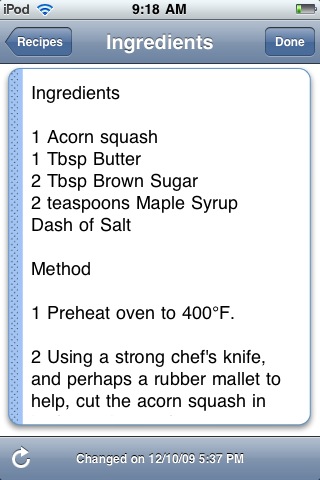
One down side to this versus using a printout or paper note card is that you can’t see the whole recipe in one screen, so you’ll need to make sure you scroll down far enough to have everything visible you need for that step in the process. You also might want to edit the recipe instructions to include the amount of each ingredient (if it isn’t like that already) within the text, to avoid scrolling up and down each time to check for quantity.
customer service
My car was broken into last week. After I got over the initial shock and disbelief, I focused on getting the window repaired and dealing with the cleanup. The thief stole my GPS (which I’d had for about three months) and the Sony eReader Touch that was sent to me to review over the next few months (which I’d had for about a week). Replacement costs for the stolen items is around $450. The window cost a bit more than the $250 deductible from my insurance. I’m still waiting on what the insurance company will do about the property loss.
When I let Sony’s PR folks know I wouldn’t be able to write the reviews, their immediate response was sympathy for my situation and an inquiry into whether they could send me a replacement. Several days later, I have received notification that I will indeed be getting a replacement from them. The cost of the reader is nominal for Sony compared to the publicity they’re likely to get by me writing about it, so it’s probably no skin off their nose to send another one, but it sure means a lot to me that they did.
This got me to thinking about libraryland and our customer service practices. Most libraries aren’t multinational companies with huge revenues, but the way we handle situations like this with our users can have an impact on our relationships with them. What would you do if one of your users came to you with a story of their car getting broken into and the library books they checked out were stolen? Would you believe them? Would your policies allow you to waive any fines or replacement costs for the lost books?
IL2009: Retooling Technical Services for the Digital Environment
Speaker: Brad Eden
We’ve heard it all before — we’re doing more with less, our work is changing dramatically, but the skill sets needed have not changed.
There are several catalysts for the change in libraries. The current economic trends indicate that state support for higher education will dwindle to nothing. We need to find different funding sources for higher education. The original hope for the Google book project was that it would challenge publishers, but instead they’ve turned around and become a publisher themselves, so we need to be prepared to pay for and provide access for our users.
People think everything is on the internet, so getting funding for library spaces and collections is challenging, so we need to repurpose our existing spaces. We need to shift our spending resources to developing access to unique local collections.
We need to move from local to network level collaboration in metadata and resource sharing. We need to train our users on how to retrieve information through their mobile devices.
[We need a speaker who recognizes that his audience is mostly technical-oriented people who are ready to change as needed and don’t need a pep talk to do it.]
Speakers: Doris Helfer, Mary Woodley, & Helen Heinrich
Retirements and new hires provided impetuses to change, along with a need to revise processes to reflect how things had changed over the past couple of decades. They decided to do the analysis in-house because of the level of staff interest and experience. They set out several objectives: eliminate duplicate & unnecessary tasks, streamline workflows, leverage technology, and explore vendor services.
They reduced the number of steps in copy cataloging (stopped checking sources and editing TOC information). They gave up shelf listing and decided to deal with duplicate call numbers if they came up. Aim for one-touch handling. Let go of perfection.
IL2009: Connecting Through “Lights, Cameras & Action”
Speaker: Sean Robinson
Stories are essentially a contract between the author and the listener, and filmmaking is about storytelling. Before you start filming, have a story in mind, whether it’s a PSA or something more involved. Stories have beginnings, middles, and endings. You have three choices: comedy, tragedy, or drama — pick one or combine them.
Vade Mecum (take a book with you) was shot on a Canon PowerShot A570. 6,000 photos were shot and edited together with a soundtrack. You can do that with the stories you want to share.
Speakers: Michael Porter & David Lee King
Over 600 images were submitted from about 400 people. There are already over 1700 fans of the Facebook page.
The video looks really cool. I need to watch it again to read the words ’cause I was so focused on seeing all the photos. Go check out the website at Libraryman.com and watch it yourself. The point is, they think there are 101 resources and things that librarians should know. Add to it!
IL2009: Technology: The Engine Driving Pop Culture-Savvy Libraries or Source of Overload?
Speaker: Elizabeth Burns
Technology and pop culture drive each other. Librarians sometimes assume that people using technology like smart phones in libraries are wasting time, both theirs and ours, but we really don’t know how they are using tech. Librarians need to learn how to use the tech that their user community employs, so don’t hinder your staff by limiting what tech they can use while in the workplace.
Libraries also have the responsibility to inform users of the services and technology available to them. Get the tools, learn how to use them, and then get to work building things with them.
Your library’s tech trendspotting group needs more than just the techie people. Get the folks who aren’t as excited about the shiny to participate and ask questions. Don’t let the fear of Betamax stop you – explore new devices and delivery methods now rather than waiting to find out if they have longevity. You never know what’s going to stick.
Speaker: Sarah Houghton-Jan
"Information overload is the Devil"
Some people think that it didn’t exist before mobile phones and home computers, but the potential has always existed. Think about the piles of books you’ve acquired but haven’t read yet. Information overload is all of the piles of things you want to learn but haven’t yet.
"We have become far more proficient in generating information than we are in managing it…"
Librarians are more equipped to handle information overload than most others. Manage your personal information consumption with the same kind of tools and skills you use in your professional life.
Some of the barriers to dealing with information overload are: lack of time or (a perceived lack of time), lack of interest or motivation, not being encouraged/threatened by management, not knowing where to start, and frustration with past attempts. Become like the automatic towel dispensers that have the towels already dispensed and ready to be torn off as needed.
Inventory your inputs and devices. Think before you send/subscribe. Schedule yourself, including unscheduled work and tasks. Use downtime (bring tech that helps you do it). Stay neat. Keep a master waiting list of things that other people "owe" you, and then periodically follow-up on them. Weed, weed, and weed again. Teach others communication etiquette (and stick to it). Schedule unplugged times, and unplug at will.
RSS/Twitter overload: Limit your feeds and following, and regularly evaluate them. Use lists to organize feeds and Twitter friends. Use RSS when applicable, and use it to send you reminders.
Interruptive technology (phone, IM, texts, Twitter, etc): Use them only when they are appropriate for you. Check it when you want to, and don’t interrupt yourself. Use your status message. Lobby for IM or Twitter at your workplace (as an alternative to phone or email, for the status message function & immediacy). Keep your phone number private. Let it ring if you are busy. Remember that work is at work and home is at home, and don’t mix the two.
Email: Stop "doing email" — start scheduling email scanning time, use it when appropriate, and deal with it by subject. Keep your inbox nearly empty and filter your messages. Limit listservs. Follow good email etiquette. Delete and archive, and keep work and personal email separate.
Physical items: Just because you can touch it, doesn’t mean you should keep it. Cancel, cancel, cancel (catalogchoice.org). Weed what you have.
Multimedia: Choose entertainment thoughtfully. Limit television viewing and schedule your entertainment time. Use your commute to your benefit.
Social networking: Schedule time on your networks. Pick a primary network and point other sites towards it. Limit your in-network IM.
Time & stress management: Use your calendar. Take breaks. Eliminate stressful interruptions. Look for software help. Balance your life and work to your own liking, not your boss’s or your spouse’s.
[Read Lifehacker!]